

Plan Your Entire Work Week With AI — In 15 Minutes
It's Sunday evening. You open a blank document, stare at a list of 40 overdue tasks, check three different apps, and somehow close everything having planned almost nothing. Monday arrives and you're reactive from the first hour.
This is not a time management problem. It's a system problem. And it's one AI can solve — if you use it with intention.
AI weekly planning doesn't mean letting a chatbot run your calendar. It means using AI as a structured thinking partner to help you clarify priorities, sequence tasks, and design a week that reflects what actually matters. In under 15 minutes.
This guide walks you through a repeatable weekly planning system used by remote workers, freelancers, and startup teams to start every week with clarity instead of chaos.
Why Traditional Weekly Planning Breaks Down
Most professionals default to one of two broken planning habits: either they don't plan at all (reactive mode), or they over-engineer their week with color-coded calendars that collapse by Tuesday afternoon.
The core problem isn't discipline — it's that planning requires sustained cognitive effort. You need to hold context from multiple projects, weigh competing priorities, estimate task durations, and anticipate conflicts — all at once. That's a significant cognitive load, especially after a full workday.
Research from the American Psychological Association suggests that decision fatigue is real and compounds throughout the day. Planning sessions scheduled after work hours, when most people attempt them, face the highest cognitive resistance.
The Sunday Night Planning Trap
Most productivity advice tells you to plan on Sunday nights. The intent is sound, but the execution often fails because the planning process itself is unstructured. You end up listing tasks without prioritizing, scheduling without estimating, and reviewing without deciding.
AI changes this by taking on the cognitive scaffolding — the sorting, sequencing, and structuring — so your brain can focus on the decisions that actually require human judgment.
The 15-Minute AI Weekly Planning Framework
This framework works with ChatGPT, Claude, Gemini, or any capable large language model. You'll need roughly 15 minutes, a list of your open tasks and commitments, and a basic understanding of your goals for the week.
Key Point:
The framework has four steps: Brain Dump (3 min) → AI Prioritization (4 min) → Block Schedule (5 min) → Daily Kickoff Prompt (3 min). Each step builds on the last.
Step 1 — Brain Dump Everything Into AI (3 Minutes)
Open your AI tool and paste in everything on your plate. Don't organize it — that's AI's job. Your brain dump should include:
• All open tasks and projects across every context
• Deadlines and hard commitments for the week
• Any carried-over items from last week
• Meetings, calls, or events already scheduled
• Any personal priorities that affect your availability
Use a prompt like this:
Prompt Template 1:
Here is everything I need to do this week. Help me identify the top 5 high-impact tasks, flag anything with a hard deadline, and note what can be delegated or dropped. Do not format yet — just analyze.
Step 2 — Let AI Prioritize and Categorize (4 Minutes)
Once AI has your full context, ask it to sort and categorize. This is where the real leverage happens. A well-prompted AI will apply an impact-effort matrix, sequence tasks by dependency, and surface items you might have underweighted.
Ask AI to sort your tasks into four categories:
1. Do this week — high impact, must be done
2. Schedule with a specific time block — important but not urgent
3. Delegate or batch — low cognitive lift, can be outsourced or grouped
4. Drop or defer — tasks that no longer serve a current goal
This mirrors the logic behind Eisenhower Matrix-style prioritization, but AI does the sorting in seconds rather than you spending 20 minutes categorizing each task manually.
Step 3 — Build Your Weekly Block Schedule (5 Minutes)
With your priorities clear, ask AI to turn them into a time-blocked schedule. Give it your available hours, your peak energy windows (if you know them), and any fixed commitments.
Prompt Template 2:
Based on my priority list, build a time-blocked schedule for Monday through Friday. I work best between 9am–12pm for deep work. I have meetings on Tuesday afternoon and Thursday morning. Leave buffer time daily. Format it as a simple table.
The output won't be perfect. It doesn't need to be. What it does is give you a draft to react to rather than a blank page to fill — and reacting is cognitively far easier than creating from scratch.
Step 4 — Generate a Daily Kickoff Prompt (3 Minutes)
The final step turns your week plan into a reusable daily system. Ask AI to generate a brief morning kickoff prompt you can use each day to check in against your weekly plan, review what's on deck, and recalibrate if needed.
This 2-minute daily check-in keeps the weekly plan alive throughout the week — rather than creating it on Sunday and ignoring it by Wednesday.
Key Point:
Weekly AI planning only works if it connects to daily execution. The kickoff prompt is the bridge between your Sunday plan and Monday through Friday reality.
Which AI Tools Work Best for Weekly Planning

Not every AI tool handles the planning workflow equally well. Here's a practical comparison based on common professional use cases:
Tool Comparison Table
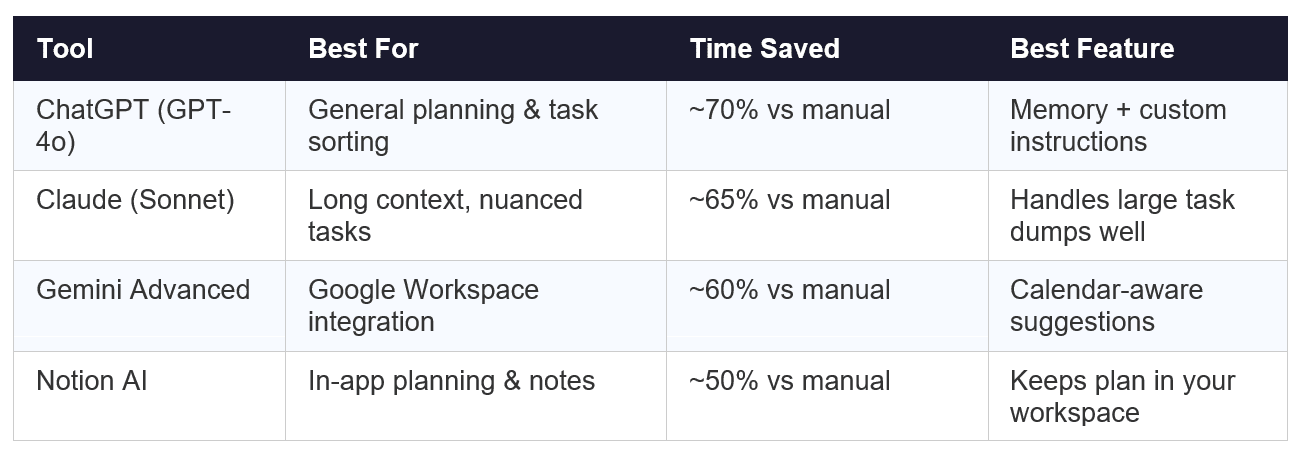
For most knowledge workers, ChatGPT or Claude will deliver the best results in this workflow. Notion AI is useful if you already manage tasks inside Notion and want to keep planning in-context.
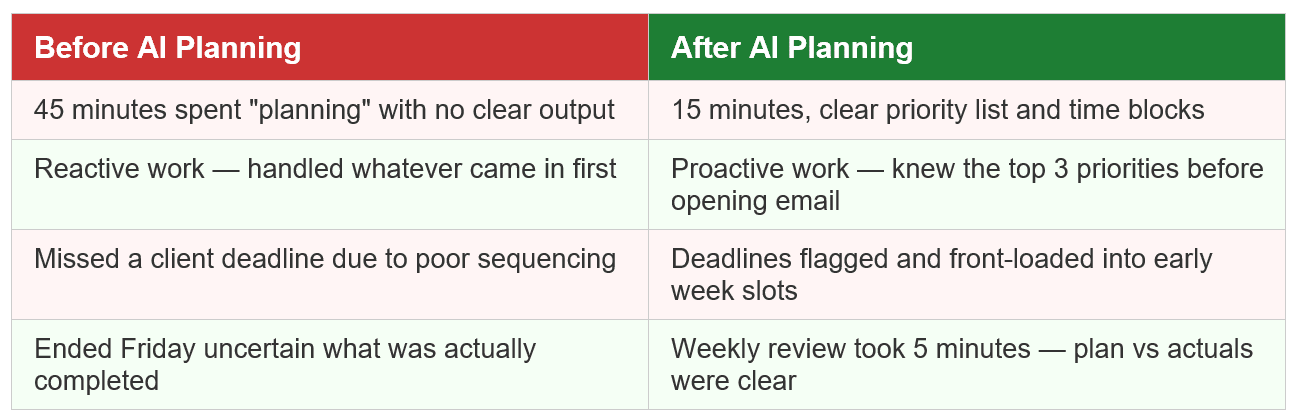
Before vs. After: A Real Freelancer's Week
Consider a freelance content strategist juggling three client accounts, a newsletter, and several prospect follow-ups. Here's the difference a 15-minute AI planning session made:
How to Customize the Framework for Your Role
The core four-step process works across professional contexts, but the prompts and priority logic shift based on what you actually do. Here's how to adapt it:
For Marketers
Weight your task list by campaign deadlines, content calendar gaps, and performance review cycles. Ask AI to identify which tasks directly contribute to active campaign metrics versus which are administrative.
• Add: 'Flag any tasks tied to a live campaign with deadlines this week'
• Add: 'Separate content creation from content distribution tasks'
• Add: 'Identify any reporting or stakeholder update tasks'
For Freelancers and Consultants
Your planning needs to account for client work, business development, and admin in separate buckets. AI helps you avoid the common trap of spending the whole week delivering while neglecting pipeline work.
• Add: 'Separate billable client work from non-billable internal tasks'
• Add: 'Flag any outreach or follow-up tasks with prospects'
• Add: 'Estimate which tasks are closest to generating revenue this week'
For Startup Teams
Team-level AI planning sessions work well in async-first environments. The lead or founder runs the same 15-minute framework, then shares the output as a team brief. This replaces or shortens the Monday planning meeting.
• Add: 'Identify which tasks have team dependencies or blockers'
• Add: 'Flag decisions that need to be made before work can proceed'
• Add: 'Summarize the week's priorities in 3 bullet points for team sharing'
Common Mistakes When Using AI to Plan Your Week
AI weekly planning fails when people use it as a task list generator rather than a thinking partner. A few patterns to avoid:
• Pasting vague task names — AI can't prioritize 'work on project' without context. Be specific.
• Skipping the brain dump — If you only feed AI your top tasks, it can't help you identify what you missed.
• Treating the first output as final — Push back on AI's suggestions. Ask it to reconsider sequencing or challenge its prioritization reasoning.
• Using AI planning as a substitute for execution — A great weekly plan means nothing without committed time blocks.
• Not reviewing the plan mid-week — Build in a Wednesday check-in to recalibrate. Five minutes, same process.
Build the System, Work the System
The goal of AI weekly planning isn't to have a perfect schedule. It's to start every week with a clear point of view on what matters most — and a structure that makes it easier to execute on that view.
Fifteen minutes of structured AI-assisted planning replaces hours of low-grade anxiety, reactive task-switching, and end-of-week regret. It's not about automation. It's about using AI to amplify the judgment you already have.
The professionals seeing the most value from AI tools right now aren't the ones using the most apps. They're the ones who've built simple, repeatable systems — and use AI deliberately within those systems.
This framework is one of those systems. Run it consistently for three weeks and it will become the most valuable 15 minutes of your week.

Frequently Asked Questions
1. Can I use this framework with free AI tools?
Yes. The prompts in this framework work with the free versions of ChatGPT and Claude. The quality of output improves with more capable models, but the process itself is model-agnostic.
2. How long does it take to see results from AI weekly planning?
Most professionals notice a difference in focus and task completion within the first two to three weeks of consistent use. The framework improves as you refine your prompts based on what works for your specific role.
3. Should I use AI to plan every day, or just weekly?
Start with weekly planning. Once that becomes a habit, layer in a 2-minute daily kickoff prompt (Step 4 of this framework) to stay aligned with your weekly plan. Daily AI planning without a weekly anchor tends to create busywork.
4. Is this framework compatible with project management tools like Asana or Notion?
Yes. Many professionals run the 15-minute AI session outside their project management tool, then transfer the prioritized list back in. Some Notion and Asana integrations allow you to paste AI outputs directly into task boards.

